 Real Estate Camera
The best iPhone app for property listing photos depends on which stage you want it to handle. Exposio and SnapSnapSnap capture several exposures in the camera. Lightroom Mobile lets you straighten walls manually. Real Estate Camera, our app, takes the photo, then fixes lighting and leaning walls and can declutter or stage rooms, for 1 or 2 credits per photo.
The prices and claims below come from each company's own pages, checked on 24 October 2026. Real Estate Camera is our app, so bear that in mind when weighing up my view of it.
The four apps side by side
Exposio and SnapSnapSnap focus on taking photos, capturing multiple exposures with each tap. Lightroom Mobile is a manual photo editor. Real Estate Camera takes one photo and edits it afterwards. The first two suit estate agents whose main concern is balancing window exposure when taking the shot. The last two suit agents who want to finish editing on their phone.
| Exposio | SnapSnapSnap (BoxBrownie) | Lightroom Mobile | Real Estate Camera | |
|---|---|---|---|---|
| What it does | Multi-shot HDR capture, stitching, AI staging, video | Camera presets with automatic exposure bracketing, paid edits | Manual photo editor | Camera plus AI enhancement, decluttering and staging |
| Price (Oct 2026) | From $9.99 a month, first property listing free | Free download; edits charged by BoxBrownie | Adobe subscription | Pay per photo, packs from $9.99 |
| Fixes leaning walls | Not stated on its page | Not stated on its page | Yes, manually | Yes, in Enhance |
| Stages empty rooms | Yes, AI Studio | Not stated in the launch post | No | Yes, 2 credits |
| Human photo editor | No | Yes, through BoxBrownie | No | No |
Exposio
Exposio is the most camera-focused of the four. Its site says one tap captures up to 27 shots, balances indoor and outdoor exposure, and stitches together a wide shot when the phone has no wide-angle lens. It also lists virtual staging, sky replacement and twilight conversion in its AI Studio, plus an automatically generated video of each shoot.
As of 24 October 2026, the page lists plans from $9.99 a month, designed for one property listing a month, with the first listing free. Optional kits cost $125 (smartphone) and $1,585 (Canon R50). If balancing window exposure is your biggest problem, this is the one to try first.
Where it falls short for some estate agents: the monthly price is based on one property listing a month, so a quiet month still costs the same. The page does not mention straightening walls.
SnapSnapSnap by BoxBrownie
BoxBrownie's launch post (February 2023) describes an iPhone app for estate agents who photograph their own properties. It sets up the camera, and for every shot the camera takes 45 to 70 photos that are combined into one, according to the company's CEO. You can send photos from the app for edits such as day-to-dusk conversion.
The app is free to download. The edits are carried out by BoxBrownie's human editors and charged per photo. See our BoxBrownie comparison for rates and turnaround times. The launch post is three years old, so check the App Store listing for the app's current features.
Where it falls short for some estate agents: human edits take time and cost more per photo than AI edits. If the property listing goes live tomorrow, that matters.
Lightroom Mobile
Adobe's help page on geometry (updated 5 June 2026) lists Auto, Level, Vertical, Full and Guided modes, plus manual sliders for distortion and perspective. It is the right tool if you enjoy editing and want full control.
Where it falls short for property listings: you work on one photo at a time, and it will not declutter or stage a room. A property listing with 30 photos means an evening adjusting sliders.
Real Estate Camera
Real Estate Camera runs on iPhone, iPad and Android. You photograph each room in the app, then choose an edit. Enhance (1 credit) fixes lighting, colour casts and leaning verticals, and handles batches of up to 40 photos. Declutter and Virtual staging cost 2 credits each, about $0.67 to $1.00 depending on the pack, and every staged file is labelled. Results take 20 to 60 seconds.
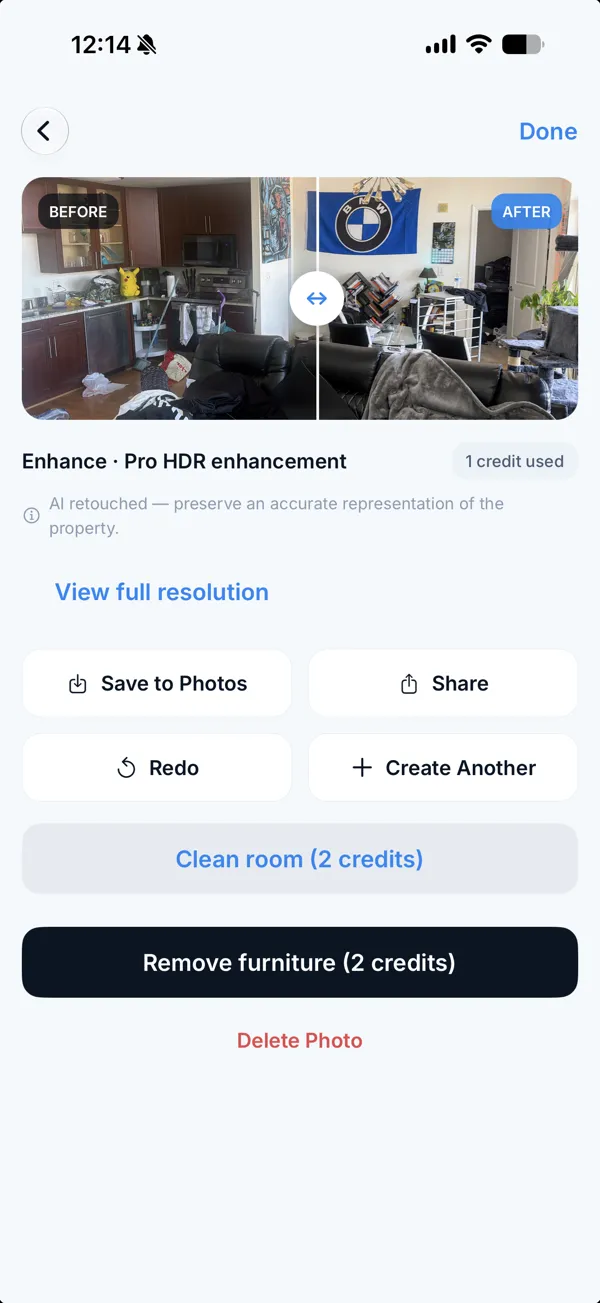
The drawbacks, honestly: it takes a single photo, so it does not capture several exposures like Exposio or SnapSnapSnap. There is no human photo editor, twilight conversion or video. Virtual staging offers eight styles with no manual furniture placement.
Which one to choose
- Windows look overexposed in every room: try Exposio's first free property listing.
- You want a person to edit the photos and can wait: SnapSnapSnap with BoxBrownie.
- You already pay for Adobe and like using sliders: Lightroom Mobile.
- You photograph a few properties a year and want straight walls, bright rooms and staged empty rooms, all from the same phone: Real Estate Camera.
Whatever app you use, how you take the photos matters more than the software. Start with how to take property photos with an iPhone and the room-by-room shot list. If a bright window is the problem, read fixing dark photos; if walls lean, read fixing vertical lines.
Thinking about doing without the photographer? Can an app replace a property photographer? covers the costs, and the Real Estate Camera photography app shows the full process.
Photograph one room and run Enhance. Start free.
More detailed comparisons: Exposio alternative, SnapSnapSnap alternative.
Questions
What is the best app for property listing photos on an iPhone?
It depends on which stage you want the app to handle. Exposio and SnapSnapSnap take several exposures per shot to balance window exposure. Real Estate Camera takes one photo and fixes lighting and leaning walls afterwards, then can declutter or stage the room. Lightroom Mobile lets you correct perspective manually.
How much does Exposio cost?
As of 24 October 2026, Exposio's site says plans start at $9.99 per month, designed for one property listing a month, and the first listing is free. Hardware kits are sold separately: $125 for the smartphone kit and $1,585 for the Canon R50 kit.
Is SnapSnapSnap free?
BoxBrownie's 2023 launch post says the app is free to download from the App Store. Edits submitted through the app are BoxBrownie services, charged per photo. Check BoxBrownie's pricing page for current rates.
Can Lightroom fix leaning walls in a phone photo?
Yes. Adobe's Lightroom Mobile help describes Auto, Level, Vertical, Full and Guided geometry modes that straighten distorted lines. You edit manually, one photo at a time, and it does not take photos, declutter or stage rooms.
Does Real Estate Camera take bracketed HDR photos?
No. It takes a single photo. The Enhance edit then corrects lighting, colour casts and leaning verticals for 1 credit. If you want the camera to capture several exposures per shot, Exposio and SnapSnapSnap do that.
Do I still need a camera app if my iPhone already has HDR?
Not always. The iPhone camera blends exposures automatically. What property listing photos usually still need is straight walls, brighter rooms and a labelled staged or decluttered version, which is an editing task rather than something handled when taking the photo.
Who makes this
Real Estate Camera is a listing photo app for iPhone, Android and the web. We wrote this page, so we have a stake in it. Other companies' prices come from their own pages on the date shown, and we say where they do better. Spot a wrong number? Tell us and we'll fix it.