 Real Estate Camera
Yes, virtual staging is allowed on the MLS. Every board rule set I checked permits it if you label the staged photo and don't change or hide anything permanent about the house. Several, including CRMLS and Canopy, also require the unstaged original right beside it. The details differ by board. A label in the remarks satisfies CVR MLS, while Canopy requires it on the image. Boards also differ on wording and on which edits a label can't excuse.
This guide covers the rule text from NAR, California and five MLSs, followed by a checklist. It is not legal advice. Your MLS's current rules and your broker take precedence over this guide. Read your board's page before your next upload.
What NAR's Code of Ethics actually says
No NAR rule uses the words "virtual staging." The duty comes from Article 12 of the 2026 Code of Ethics, which says REALTORS® "shall be honest and truthful in their real estate communications." It also requires them to "present a true picture" in advertising.
Standard of Practice 12-10 applies that obligation to images. It prohibits "otherwise misleading consumers, including use of misleading images."
You'll see articles cite Standard of Practice 12-5 for staging. Read 12-5 yourself. It's about disclosing your firm's name in ads and has nothing to do with photos. If someone cites it in a staging dispute, point them to 12-10.
The NAR Code binds only REALTOR® members and is enforced through ethics complaints at your local association. Your MLS rules determine whether a listing gets pulled. In California, state law also applies.
California made it state law: AB 723
California is the one state I found where this moved from association guidance into statute. AB 723 added Section 10140.8 to the Business and Professions Code, effective January 1, 2026. Here's what it requires:
- For ads and promotional material, put a statement that the image was altered "on or adjacent to the image," plus a link, URL or QR code to a public page showing the original. AB 723 covers flyers and social posts as well as the MLS.
- On websites you control, post the unaltered version alongside or link to a page that has it.
- Under AB 723, adding, removing or changing furniture counts as alteration. So do changes to fixtures, appliances, flooring, walls, paint color, landscaping, the facade or the view out a window. The law names utility poles and neighboring houses too.
- The exclusions cover lighting, sharpening, white balance, color correction, angle, straightening, cropping and exposure changes "that do not change the representation of the real property."
Under that last part of AB 723, fixing a dark room or straightening leaning walls doesn't make a photo digitally altered. Removing a seller's sofa does.
What real MLS rules say
I included only boards whose current rules I could read on their own sites. These five MLS examples show how requirements differ. Check your own board's current wording before relying on any of them.
CRMLS (California)
The CRMLS guidance for Rule 11.5.2 requires the original "immediately before or after" the altered image. In the photo description field, label the edit "digitally enhanced," "digitally altered" or "virtually staged." No watermark is required. Virtually emptying a furnished room counts as altered, too. CRMLS prohibits changes to real parts of the property, including wall color, flooring, cabinets and landscaping. AI-generated landscaping isn't allowed at all. Enforcement starts with a warning, followed by a $250 fine if you don't fix the problem in time.
Other California MLSs wrote their own versions. Bay East's rule requires the original immediately after the altered image. Even within California, the order matters.
Canopy MLS (Charlotte region)
Canopy is the strictest board I read. Its disclosure must be "directly ON the image or within the virtual tour." Captions or remarks alone are "NOT acceptable." The unstaged original goes immediately before or after. Canopy allows furniture and decor additions, including art and plants. It also allows paint changes if nothing structural is implied. Adding a pool or fireplace is prohibited, as is removing power lines or a highway. Defects must stay visible.
NorthstarMLS (Minnesota and nearby)
NorthstarMLS published guidelines in July 2026 that it describes as proposed. They ask for a label in the caption, filename or on the photo, plus an unaltered "before" image for every staged room. They also prohibit changes to permanent elements, including walls, floor coverings, windows, ceilings and fireplaces. Cropping is fine, as are exposure and color-balance adjustments.
CVR MLS (Central Virginia)
Section 5.8.2 is one sentence: if a photo was altered by virtual staging, disclose it in the remarks field. That's the light end of the range.
North Carolina, outside the MLS
NC REALTORS® reports that, according to a Commission attorney, the NC Real Estate Commission allows staging if the ad isn't misleading and the alteration is disclosed. It cites the License Law's ban on "pursuing a course of misrepresentation." Making a run-down home look like it's in good condition crosses that line. So does editing out defects, inside or out. NC REALTORS® also says disclosures belong in the public remarks.
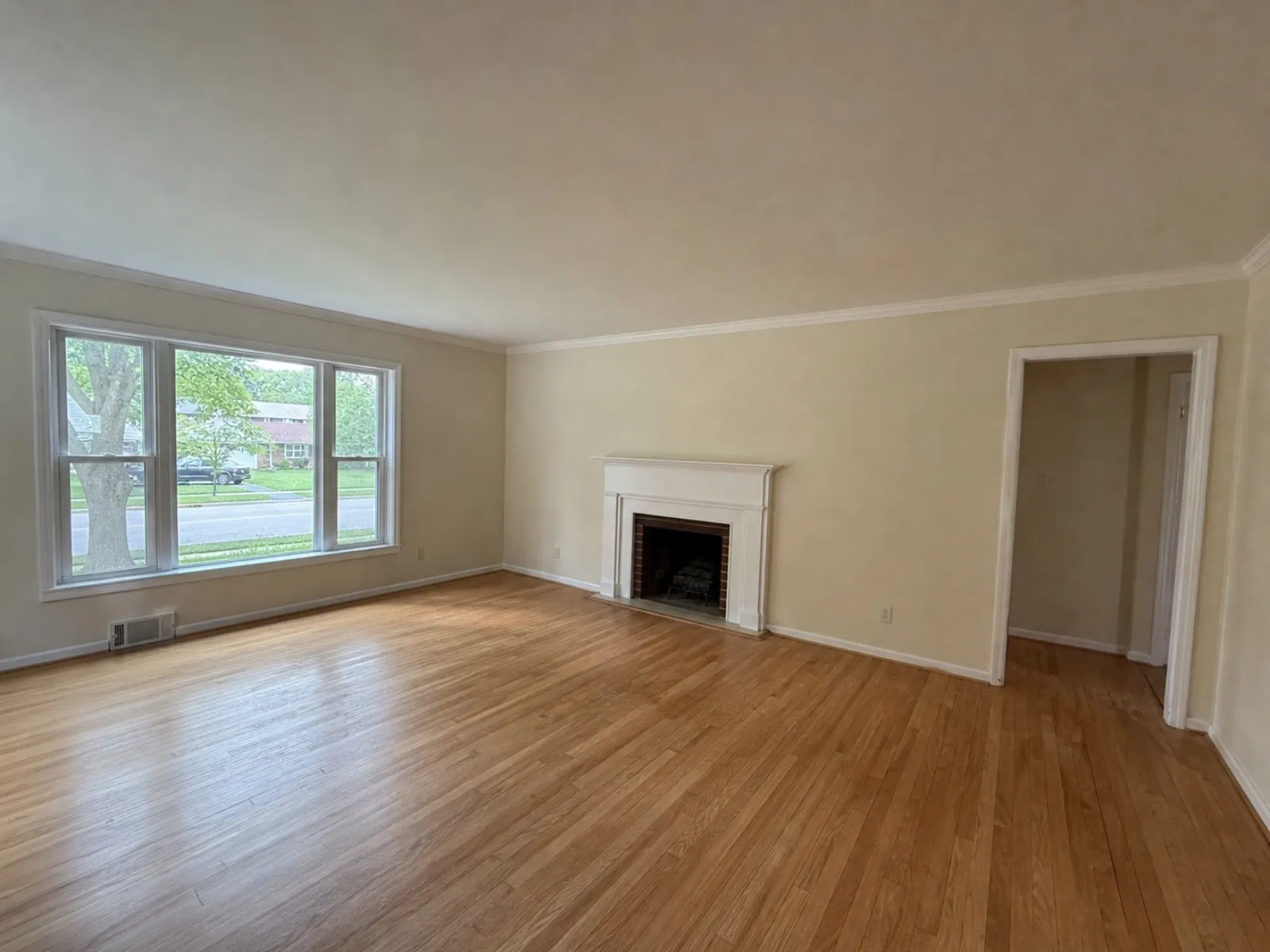
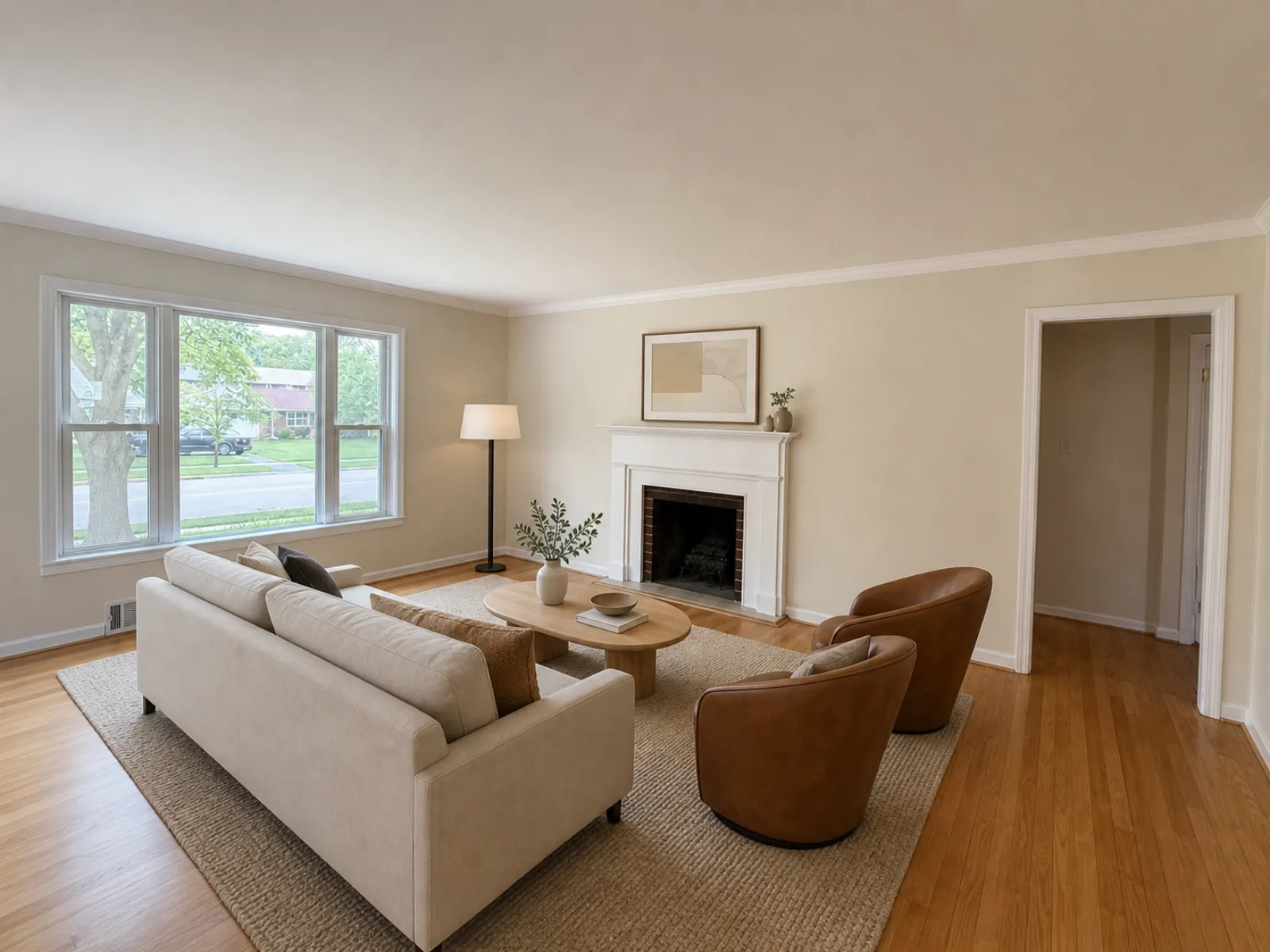
What almost every rule agrees on
Across these five MLSs, the rules largely agree on four points.
- Every board I read requires you to label the staged photo.
- California and Canopy require you to show the original. Northstar proposes it. Where it isn't required, it still protects you.
- Keep staging to furniture and other things that don't convey with the sale. Adding or removing those is fine. Changing walls, floors, windows, fireplaces or cabinets isn't, even with a label.
- The photo must keep defects visible. Leave a water stain or crack in place. The power lines out back stay, too.
Paint color is the real split. Canopy allows cosmetic paint changes with disclosure, while CRMLS lists wall color among the things you can't change. If you're unsure, don't recolor walls.
A disclosure checklist for your next listing
I'd use this checklist on any board. It follows the strictest version of each requirement above, from Canopy's on-image label to CVR MLS's remarks disclosure.
- Read your MLS's current photo rule before uploading. Search its help center for "virtual staging" or "digitally altered."
- Put "Virtually staged" on the image itself, in a corner where cropping won't cut it off. That covers boards such as Canopy.
- Also type "Virtually staged" in the photo's caption or description field, as CRMLS requires.
- Upload the unstaged original directly before or after it. Follow your board's specified order: Bay East, for example, requires the original after the edit.
- Add one line to the public remarks: "Some photos are virtually staged. Furniture and decor shown are not included."
- Compare the staged photo with the original before uploading. Windows, doors, the fireplace, flooring and ceiling height should all match. If the software moved a window or changed the floor, discard that version.
- Don't stage a room with damage until the damage is fixed or disclosed.
- Label decluttered photos too. Removing furniture counts as altered in California.
- For flyers and social posts in California, add the altered-image statement and a link or QR code to the originals.
- Keep the originals and edited files together in the listing folder. If a complaint comes in, you can show both.
Start with an honest photo. Under California's definition, straightening walls and correcting exposure don't count as altering the property. Our guides to fixing leaning vertical lines and fixing dark listing photos cover those adjustments. For a furnished room you want to show empty, removing furniture from photos explains the labeling.
How Real Estate Camera handles disclosure
Real Estate Camera tags every virtually staged result "virtually staged" and asks you to confirm the disclosure before export. The original stays in the same place, ready to upload beside the staged version. The app doesn't stamp text onto the pixels. For Canopy's on-image requirement, you'll need to add that label yourself in your MLS's photo tool or another photo editor.
Real Estate Camera adds furniture to empty rooms in one of eight styles. It isn't built to repaint walls or swap floors, which keeps its staging within the rules above. Check every result against the original anyway, just as you would with another tool or a human editor.
What happens if you get it wrong
Under the rules above, it starts with a notice from your MLS. CRMLS sends a warning, then imposes a $250 fine if the problem isn't corrected. Bay East refers to enforcement under its rules without naming an amount. California's requirement is part of the Business and Professions Code, so it applies to flyers and social posts where no MLS is watching. And a buyer who feels misled by a REALTOR® member can file an ethics complaint under Article 12.
I'd worry more about the showing than the $250 fine. A buyer who expects the room in the photo and finds a different one has stopped trusting the listing before reaching the kitchen. A label and the original photo let them arrive knowing what they're coming to see.
For the rest of your listing photos, see the real estate photo shot list and how to shoot listing photos on an iPhone. To compare tools, see the prices in how much virtual staging costs and the features in the best virtual staging apps.
Questions
Is virtual staging allowed on the MLS?
Yes. Every MLS rule set we checked allows it if you label the staged photo and don't change or hide anything permanent about the house. Several boards, including CRMLS and Canopy MLS, also require the unstaged original right next to it.
Where do I put the virtually staged label?
Check your board's rule. CRMLS wants it in the photo description field. Canopy MLS requires it on the image itself. CVR MLS requires it in the remarks. Use all three locations to cover those requirements.
Do I have to upload the original unstaged photo?
In California, yes: AB 723 and the MLS rules built on it require the unaltered photo. Canopy MLS and NorthstarMLS's published guidelines ask for it too. I'd upload it everywhere. It's the easiest proof you weren't hiding anything.
Does brightening or straightening a photo count as digitally altered?
California's definition excludes lighting, white balance, color correction, straightening, cropping and exposure changes that don't change how the property is represented. Removing furniture or swapping a sky does count.
Which NAR rule covers virtual staging?
Article 12 of the Code of Ethics requires a true picture in advertising. Standard of Practice 12-10 bans misleading images. You'll also see Standard of Practice 12-5 cited, but that rule is about showing your firm's name.