Real Estate Camera
A good real estate photo editing app fixes the lighting, colour and leaning walls in every photo, empties furnished rooms, and stages empty ones, all on the phone you took the photos with. It should do that without changing the house. Real Estate Camera is built for this: Enhance costs 1 credit per photo, and Declutter and virtual staging cost 2 each. Each edit comes back in 20 to 60 seconds, so you can finish a listing before you lock up.
Below is what I'd expect from any AI photo editor for real estate agents, where I'd draw the line with honest edits, and a room-by-room walkthrough of one listing edited in our app. It's our product, so I've also covered what it can't do.
What a listing photo app should do
Most listing photos don't need a designer. They just need the same few fixes, done consistently every time.
- Fix exposure and colour. Phone shots of interiors come out yellow under warm bulbs or grey from a cloudy window. White cabinets should look white.
- Straighten verticals. A phone held a little high or low makes the walls lean. Buyers feel it even if they can't name it.
- Recover window detail. Expose the room and the window blows out to a white rectangle. A good edit shows what's actually outside.
- Empty a furnished room when the seller's furniture is dated or crowded, without leaving smears on the floor where the sofa was.
- Stage an empty room so buyers can get a sense of its size, in a style that suits the house.
- Work wherever you are. If you shoot on a phone, the edits should happen on the phone, not on a laptop at 11pm.
The honest-edit line
An editing app can make a photo better or make the house look like a different house. Only the first is your job.
California set this out in law. AB 723 excludes edits where only "lighting, sharpening, white balance, color correction, angle, straightening, cropping, exposure, or other common photo editing adjustments" are made, as long as they don't change the representation of the property. Adding, removing or changing furniture, flooring, paint colour, landscaping or the view through a window is an alteration, and needs a disclosure. Most MLS rules follow the same idea.
That's why Real Estate Camera's Enhance is built the way it is:
- It keeps the sky exactly as shot. A grey day stays grey. It never turns a grey sky blue.
- It never changes the architecture or landscaping. No greener lawns, no patched-up cladding.
- It doesn't do twilight conversions. That's a deliberate choice, and it means you can't get a dusk hero shot from us.
Declutter and staging do change what's in the room, so those need a label. More on that in step five.
Walkthrough: one listing from start to finish on a mobile
Here's a typical three-bedroom home. Some rooms still contain the seller's furniture, some are empty, and it's overcast outside.
Step 1: Take good photos
Editing can fix a lot, but it can't make up for a room photo taken from the doorway. Switch on all the lights, open the blinds, and hold the phone at light-switch height, keeping the camera level. Shoot in landscape from the corners. The iPhone guide covers the settings, while the shot list shows you which rooms to photograph.
Real Estate Camera has its own camera app for iPhone, iPad and Android. If a photographer took the photos, or you used another device, upload them on the web instead. Either way, you use the same account and credit balance.
Step 2: Enhance every shot
Run Enhance on every photo in the gallery for 1 credit each. It corrects lighting and white balance, straightens vertical lines and restores the view through windows.
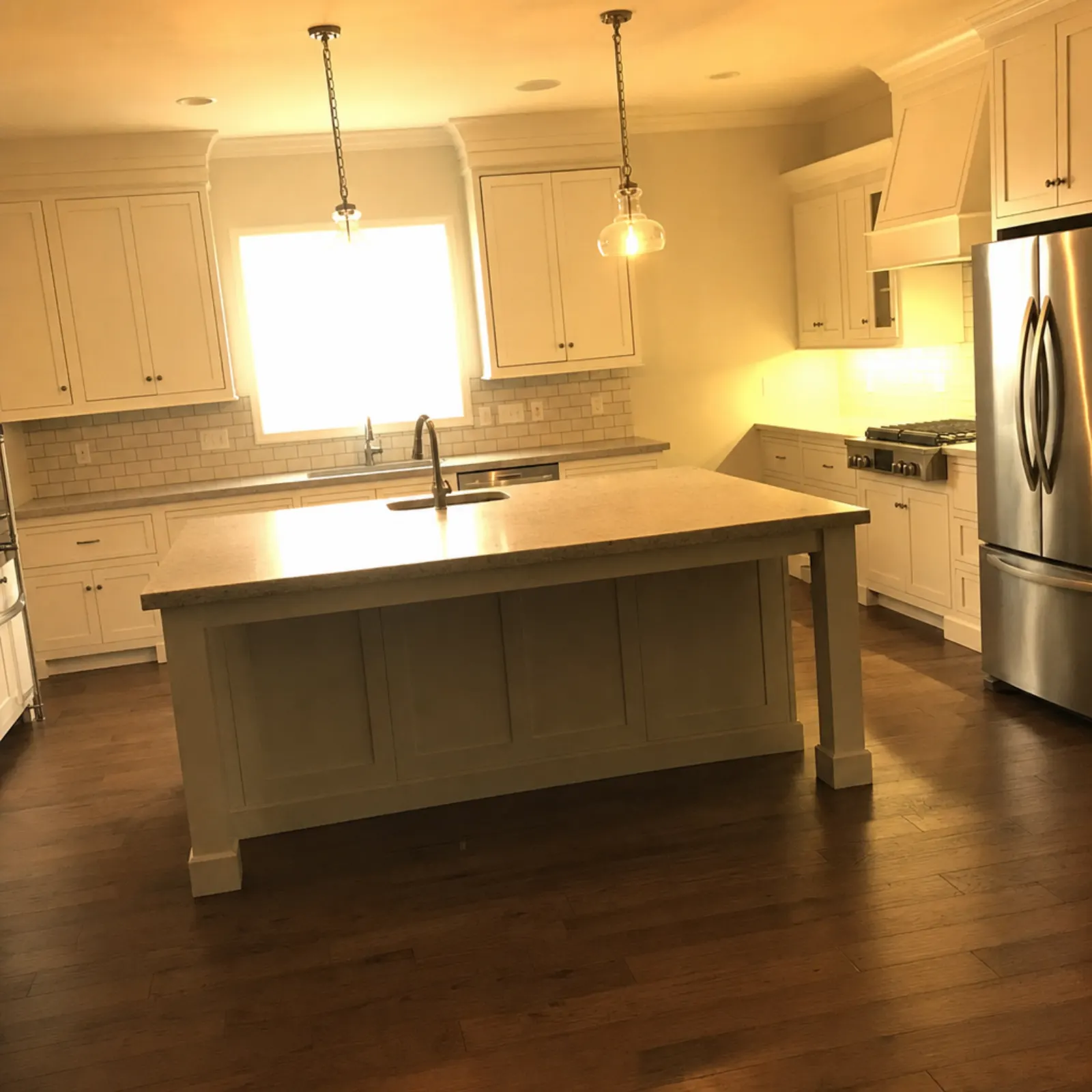
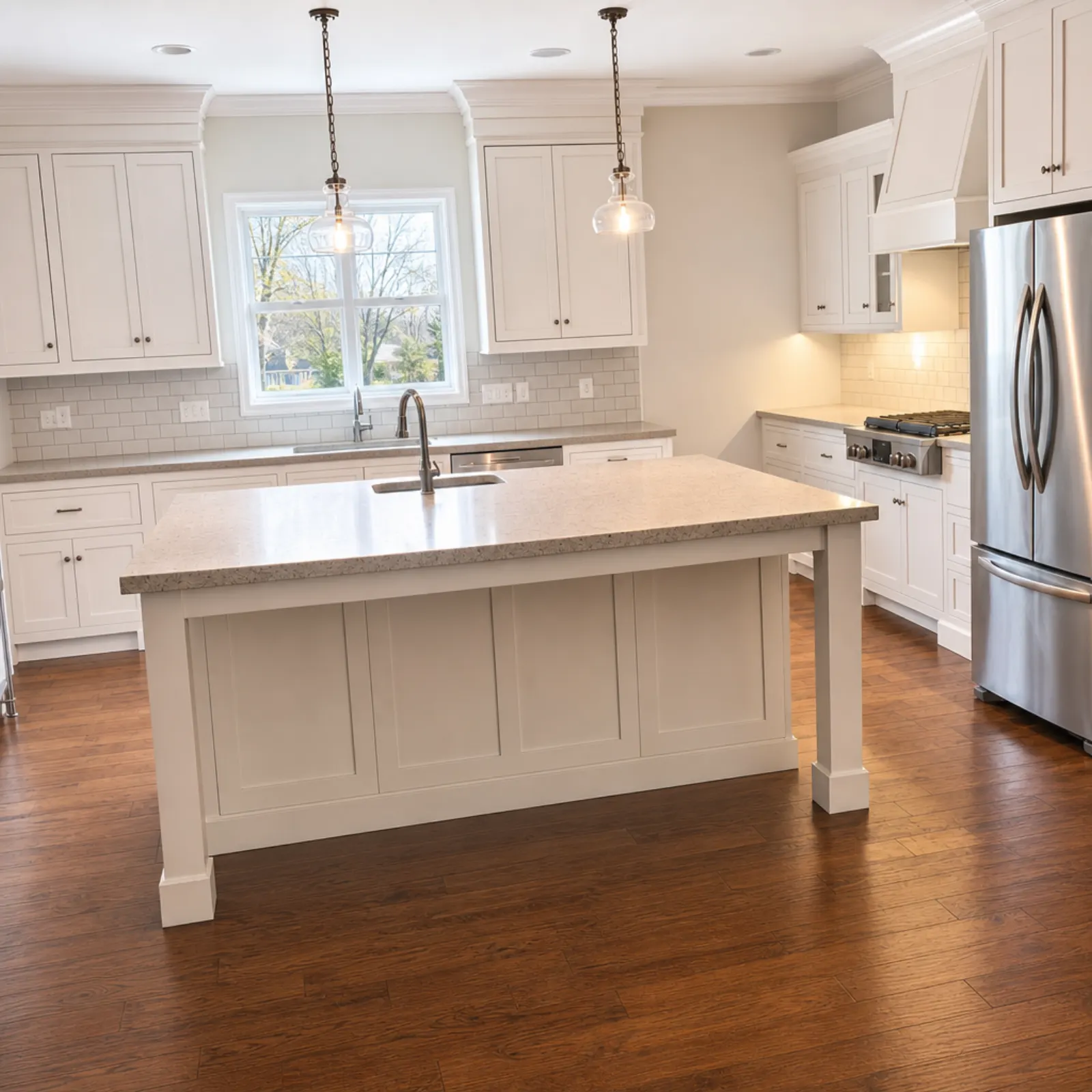
Compare that window with the actual view outside. If the original is featureless white, the software has very little to work with. Enhance is designed to recover the actual view without replacing it with something else, but you were there and know it isn't. If the trees and the house next door look right, you're done. If they don't, don't use that version. California law names "views through windows" as an alteration.
Exteriors receive the same treatment. On a grey day, the house can look straighter and the exterior cladding cleaner under the same grey sky. For more on the specific problem of dark rooms, see fixing dark real estate photos.
Step 3: Declutter the furnished rooms
For rooms where the seller's furniture detracts from the photo, run Declutter for 2 credits. It removes furniture and decorations, then rebuilds the floor and walls behind them.
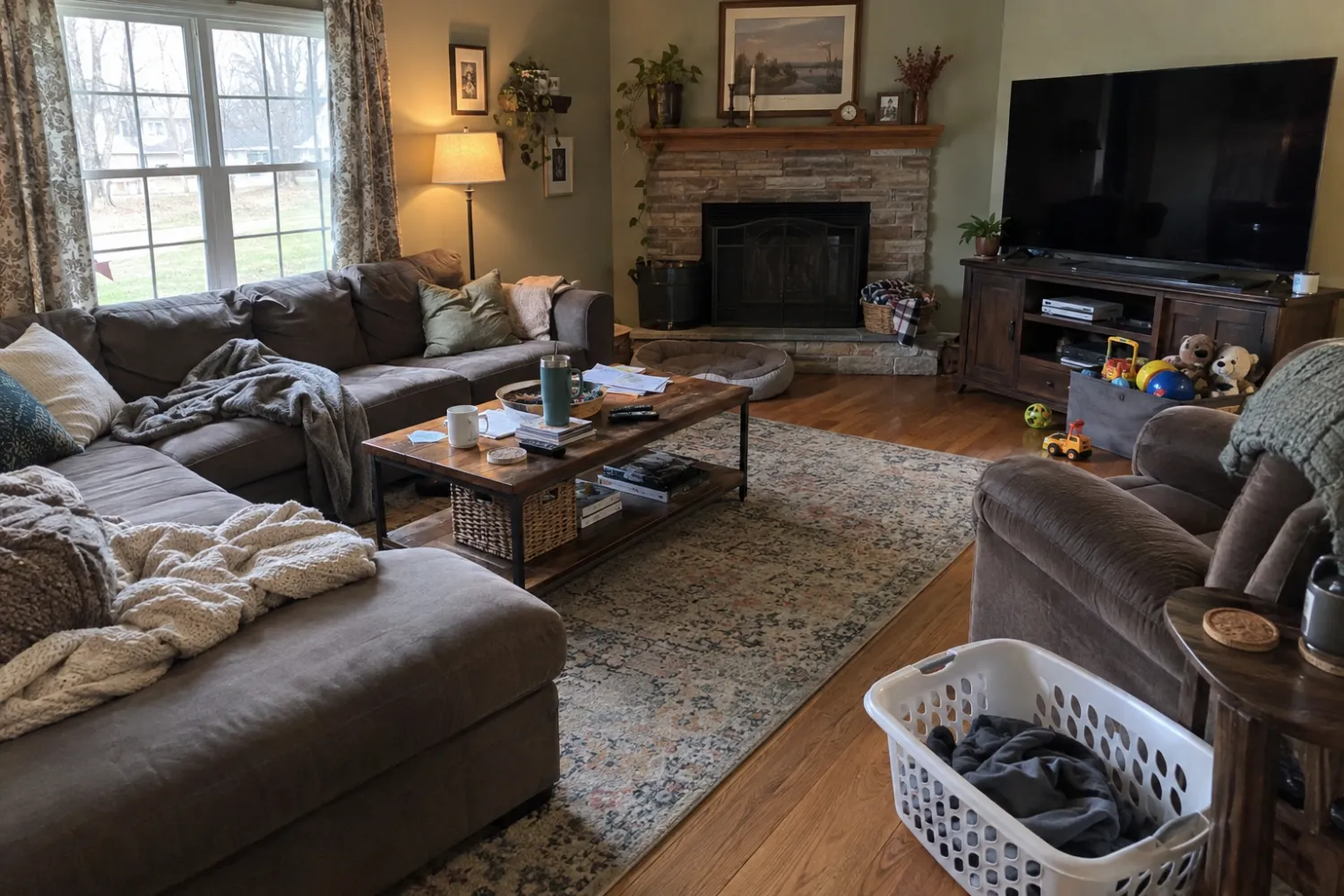
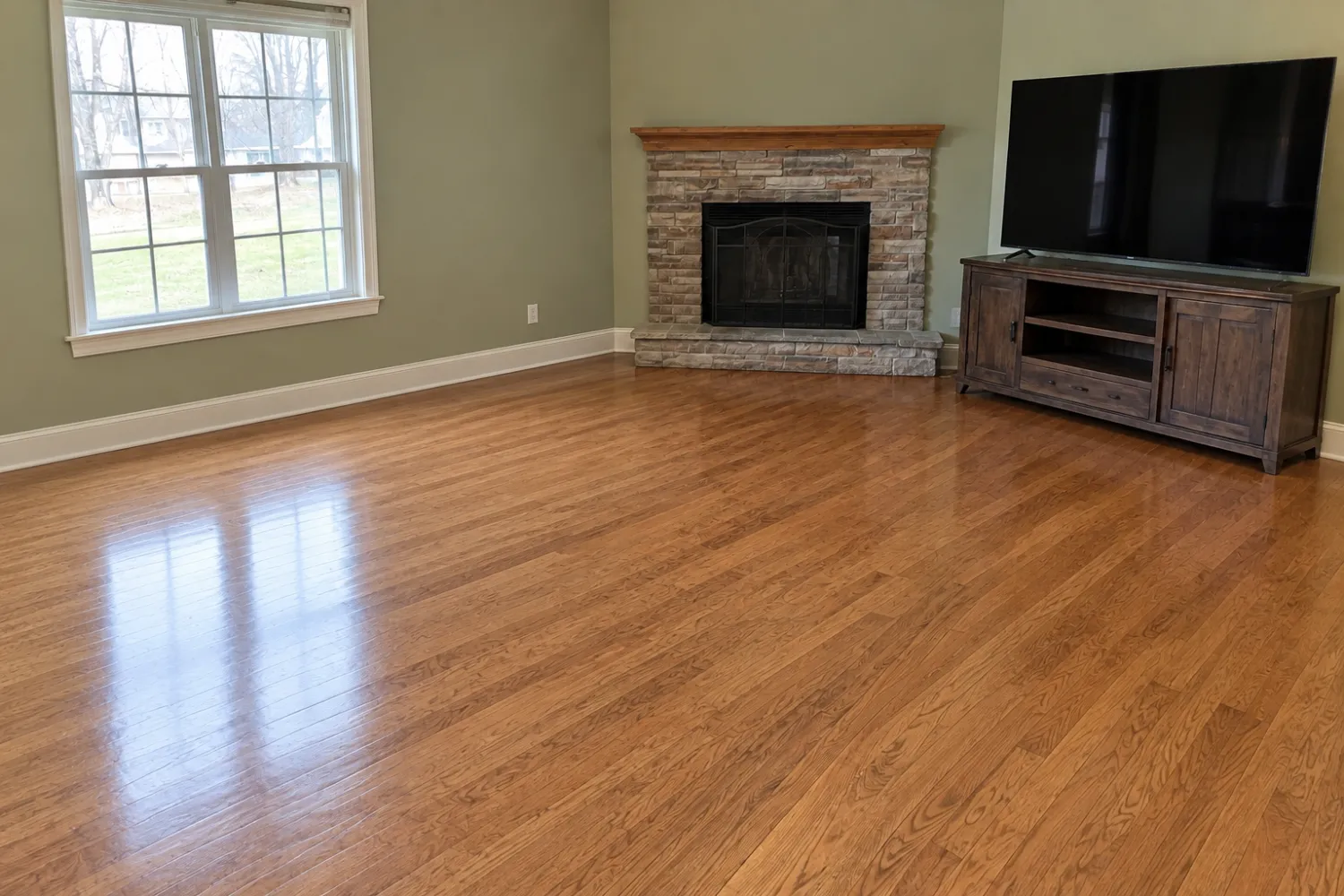
Check what it kept as well as what it removed. Here, the TV unit survived. In another room, it might be a floor lamp. There's no manual masking tool, so if the result isn't what you want, run it again or keep the original.
In California and on most boards that address this issue, a photo of an emptied room is considered digitally altered. You can show a staged version alongside it or use the empty version, but either way it must be labelled. See removing furniture from photos for more information.
Step 4: Stage the empty rooms
For empty rooms, whether they were empty from the start or you've just decluttered them, run Virtual staging for 2 credits. Choose the room type: lounge room, bedroom, kitchen, dining room, bathroom, home office, kids' room or outdoor/patio area. Then choose a style: Modern, Scandinavian, Modern Farmhouse, Luxury Contemporary, Traditional, Mid-Century, Coastal or Japandi.
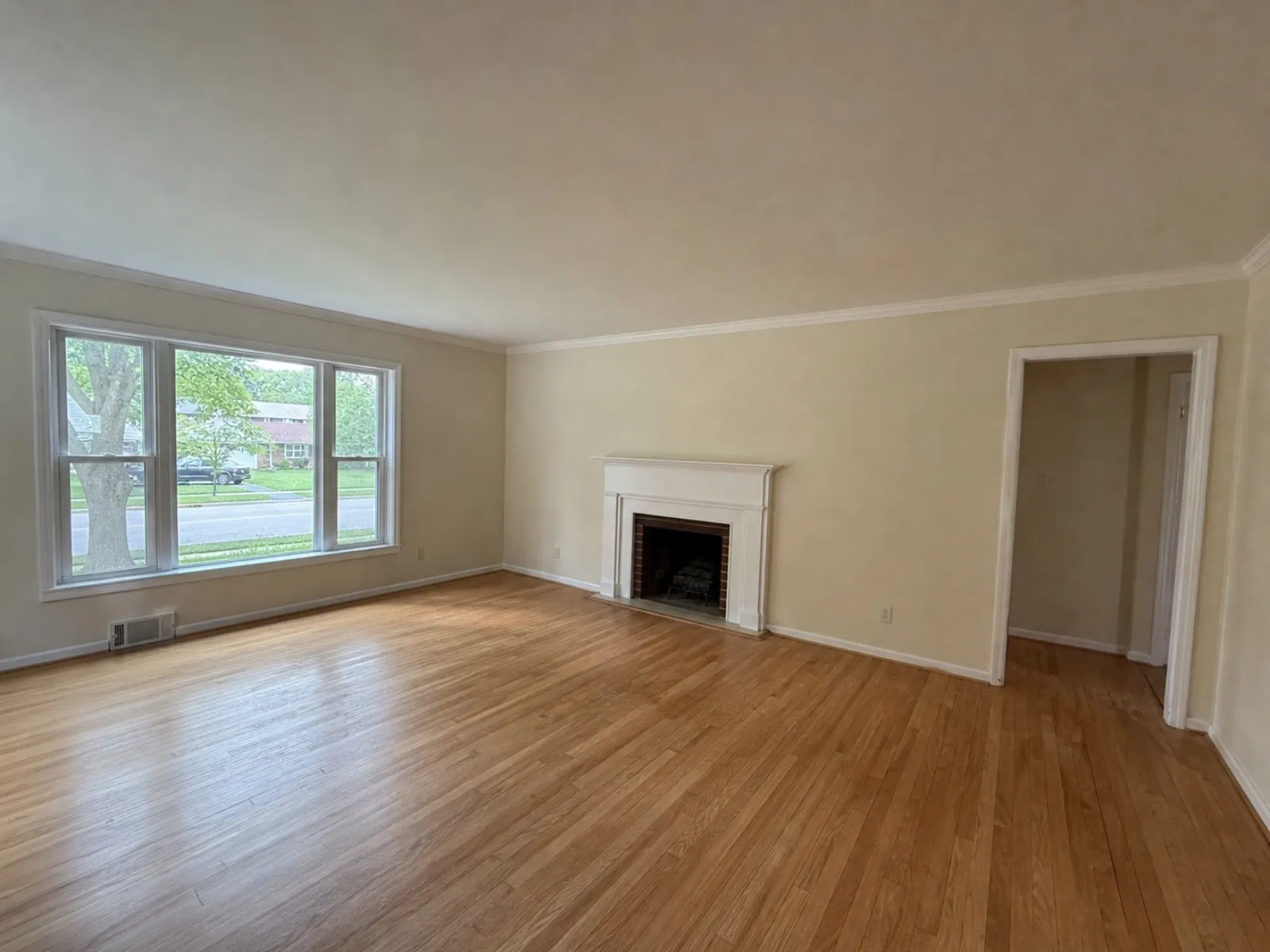
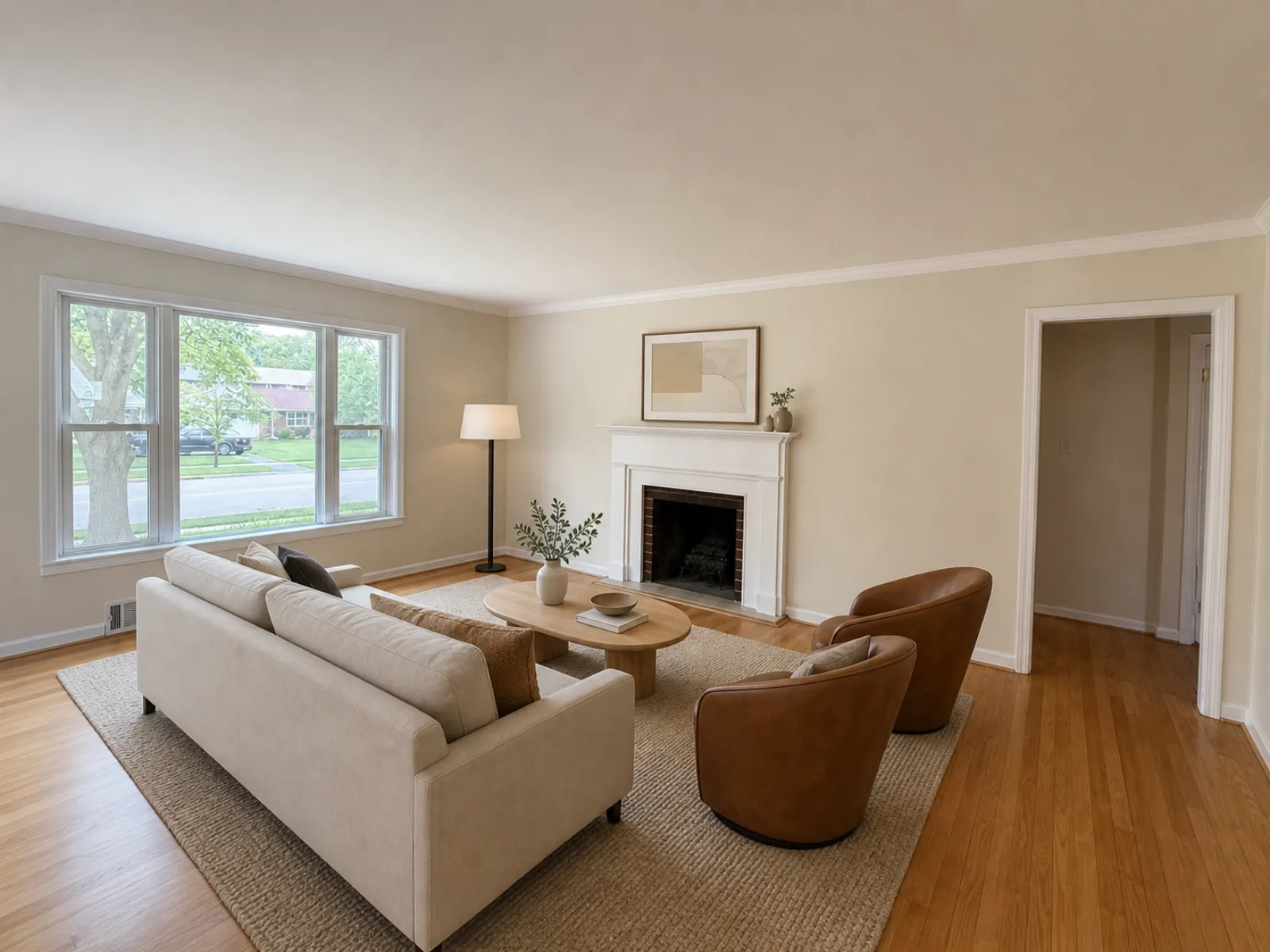
I wouldn't stage every empty room. Staging is most useful in the lounge room, the main bedroom and any room whose purpose isn't obvious, such as a bonus room or a small office. Bathrooms and hallways usually don't need it.
There are eight styles, with no drag-and-drop editing. You can't move the sofa or swap one chair. If the layout isn't right, run it again, but that uses another 2 credits. If you need to position items manually, the guide to the best virtual staging apps covers tools that let you do so.
Step 5: Check, label and export
Before anything goes on the MLS, place each edited photo beside its original and check the fixed features: windows, doors, fireplace, floor line and ceiling. AI staging can occasionally move a window or reshape a mantel. If that happens, run it again.
Staged results are flagged as "virtually staged" in the app, and you'll be asked to confirm the disclosure when exporting. The label isn't printed on the image. If a board requires the disclosure on the photo itself, add it using your MLS photo tool or another editor. Where your board requires it, upload the unaltered original next to each staged or decluttered photo. The MLS rules guide covers each board's requirements, and California agents should read the AB 723 checklist.
What that listing cost
| Step | Photos | Credits |
|---|---|---|
| Enhance | 25 | 25 |
| Declutter | 3 | 6 |
| Virtual staging | 4 | 8 |
| Total | 39 |
Credit packs contain 20 credits for $9.99, 60 for $24.99 and 150 for $49.99. This listing fits within the 60-credit pack, leaving 21 credits for the next one. Credits never expire, refunds for failed edits are automatic, and the first credit is free. For a comparison with other tools and human services, see how much virtual staging costs, the BoxBrownie alternative guide and the Virtual Staging AI alternative guide.
What it won't do
- No sky replacement or twilight. A grey day stays grey.
- Eight staging styles, no manual furniture placement.
- No human editor to take notes or fix a render for you.
- No label printed on the image.
If you need any of those, a human service like BoxBrownie is the better choice for that photo. For everything else, you can get the app on the App Store or Google Play, or sign in on the web.
To learn more about Enhance, see AI real estate photo editing.
Edit a listing from start to finish on your phone. Start free: 1 credit.
Questions
What is the best photo editing app for real estate agents?
One that fixes the lighting, colour and leaning walls in every photo, can remove all the furniture from a furnished room and stage an empty one, and runs on the phone you took the photos with. It should also leave the house itself untouched. Real Estate Camera does this on iPhone, iPad and Android, with results ready in 20 to 60 seconds.
Can AI edit real estate photos without making them misleading?
Yes, if the edits are corrections. Fixing exposure, white balance and verticals changes how the photo looks, not what the house is. Replacing the sky, repainting walls or replacing a lawn changes the property, and removing or adding furniture needs a label.
How much does it cost to edit a listing in Real Estate Camera?
Enhance costs 1 credit per photo, while Declutter and virtual staging cost 2 each. A 25-photo listing with three rooms emptied and four staged uses 39 credits, which fits within the 60-credit pack at $24.99. The first credit is free and credits never expire.
Does the app add a virtually staged label to the photo?
It flags staged results as virtually staged in the app and asks you to confirm the disclosure when you export. It doesn't print the label on the image, so if boards require it on the photo, add it yourself.